Why do I need to select a ROOT PATH ?
From Android 10, Google has implemented several changes to the storage access system.
In order to migrate to the new system (Scoped Storage), we redesigned everything that was related to file operations.
As we focused on user experience, we decided to implement our own system to continue working with regular file paths and try to keep a backward compatibility.
What is a ROOT PATH ?
The "root” path is where everything is stored and usually shows as /
Eg: /documents/wakdev.pdf where the first / character is the root path.
In the new version, you must define what directory tree you want to use as the root path. To maintain a backward compatibility, we advise you to select the entire device storage. But you can also select another directory for better protection and privacy, and to isolate all file operations.
Eg: If you select the device directory “/storage/emulated/0/example/” as the root path, the following path “/dir/file.txt” used in a task, will be truly located on the device in “/storage/emulated/0/example/dir/file.txt”
How can I set a ROOT PATH ?
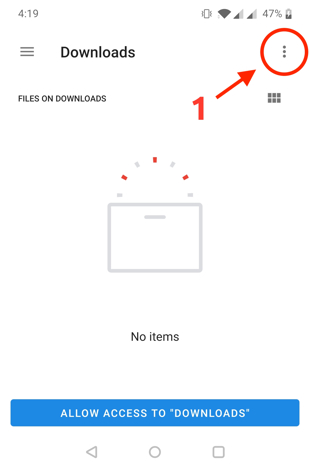
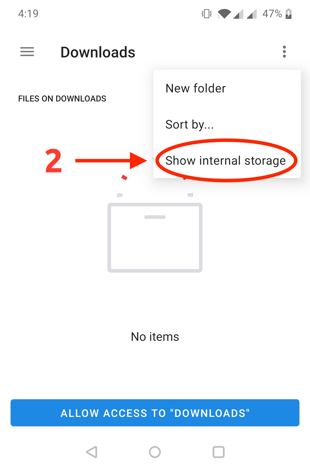
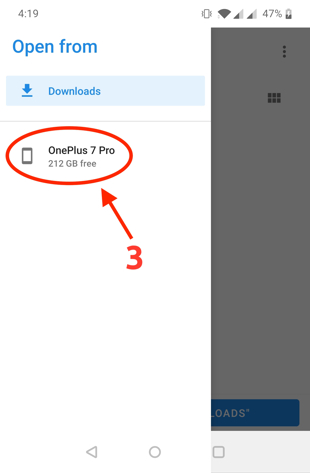
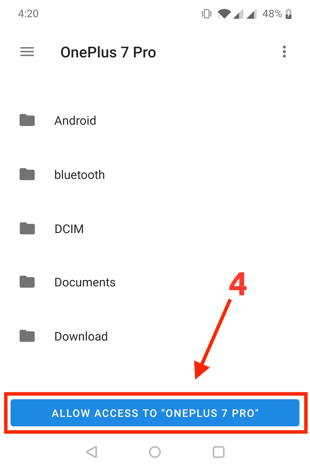
Open permissions settings in the app, and click on “Set root path”, then follow the steps below and click on "Allow access on..."