
NDEF Format Explained Simply
Bring a properly encoded NFC tag near any recent smartphone: the link opens, the business card appears, the Wi-Fi connects.
If this works the same way everywhere, it is because tags and phones share one common format: NDEF.
This article explains what an NDEF message contains, then goes further for those who want the details: the anatomy of a record, byte by byte, and the TLV structures that hold it in the chip's memory.
NDEF, the Common Language of NFC
NDEF stands for NFC Data Exchange Format, the data exchange format defined by the NFC Forum, the organization that standardizes the technology.
Its role is to guarantee that content written on a tag can be understood by any reader, regardless of who manufactured the chip or the phone.
NDEF is also independent of the hardware: whether the tag is Type 1, 2, 3, 4 or 5, the message it carries is written and read in exactly the same way. This is why the same encoded link works just as well on an NTAG213 as on an ISO 15693 chip.
One Message, Multiple Records
An NDEF message is a container holding one or more records.
Each record is made of three parts: a small header of a few bytes, a type that declares the nature of the content (a URL, text, a business card...), and the payload, the content itself.
In most cases a message contains a single record, typically a URL, but nothing prevents you from writing several: a URL plus a text record plus an application record, for example. The phone reads the records in order, but most smartphones only interpret and execute the first one.
Important: if you place multiple records on a tag, always put the main content in first position, otherwise the phone will completely ignore it.
The Most Common Record Types
Here are the main types of content for an NFC tag:
- URL / URI: Opens a website.
- Text: Displays text.
- vCard: Adds a contact (name, phone, email, ...).
- Wi-Fi / Bluetooth: Connects to a network or a device.
- MIME / Media: Carries raw files or data formats.
- External Type: Stores custom, application-specific data.
- AAR (Android): Launches an Android app or opens the Play Store (ignored by iPhones).
Note: most specific actions (social networks, payments, custom links) actually rely on URL or MIME records.
Anatomy of a URL Record
NDEF was designed for chips where every byte counts, and URLs benefit from a dedicated optimization: the most common prefixes are replaced by a single-byte code. The whole "https://www." becomes code 02. As a result, the full address https://www.wakdev.com takes up only fifteen bytes.
Those fifteen bytes are: four header bytes (D1 01 0B 55, announcing a single record of type U for URI with eleven bytes of content), the 02 prefix code, then the ten characters of wakdev.com. This compression is what allows a small 64-byte chip to hold a short link, and an NTAG213 to store a URL of around 132 characters.
Every bit of this header has a role.
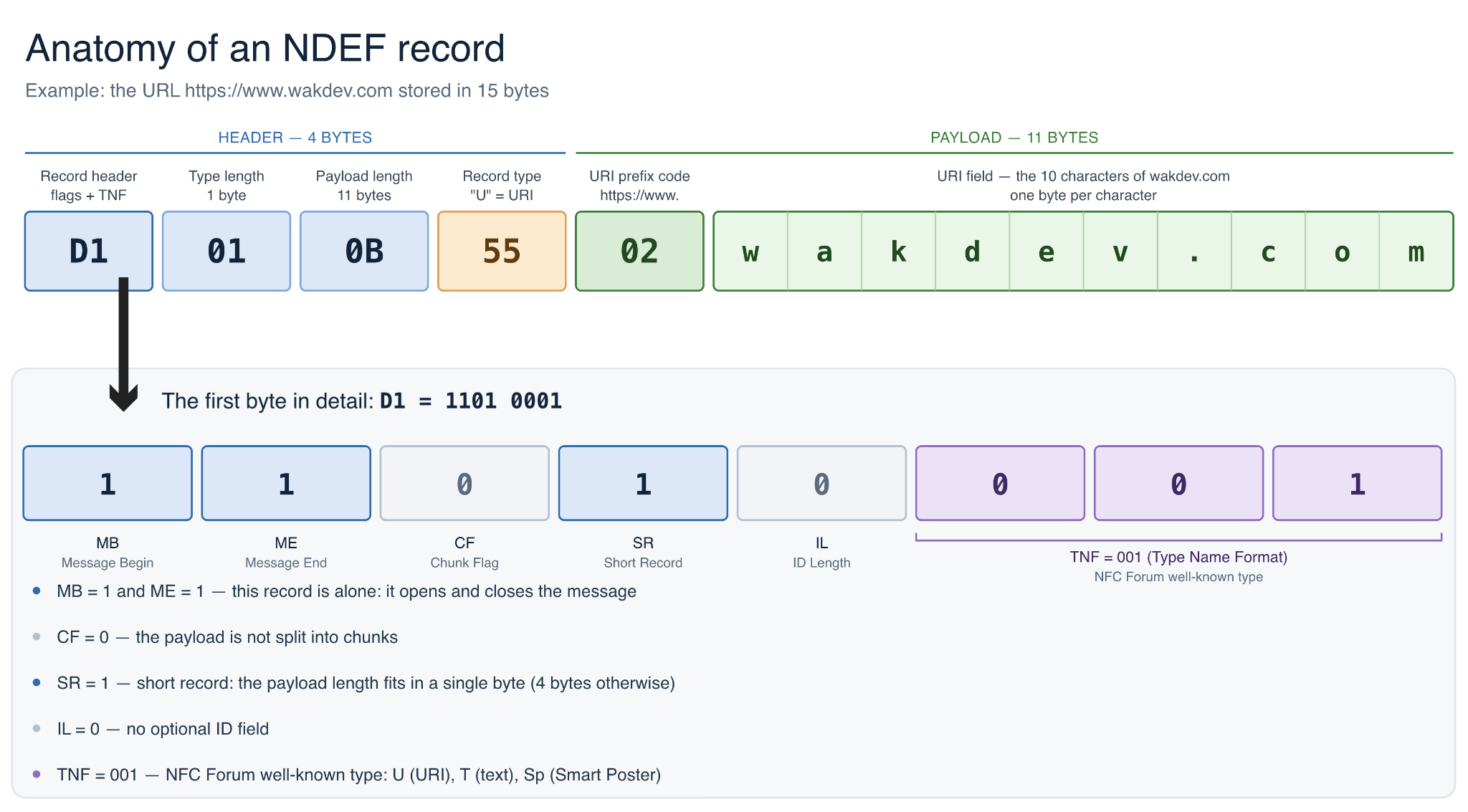
The first byte packs five flags and a 3-bit field. MB (Message Begin) marks the first record of the message, ME (Message End) the last one. CF (Chunk Flag) signals chunked content, which you will almost never see on tags. SR (Short Record) indicates a short record whose length fits on a single byte. IL (ID Length) announces the presence of an optional identifier.
The remaining three bits form the TNF (Type Name Format), the family the type belongs to. For a URL, its value is 001, the value assigned to NFC Forum well-known types. Other values exist for MIME types or externally defined types, but they are not needed here.
Applied to our first byte, D1, or 1101 0001 in binary: MB is 1, ME is 1 (the record is alone, so it opens and closes the message), CF is 0, SR is 1 (short format), IL is 0 (no identifier), and TNF is 001 (well-known type).
Then come the type length (01: a single character), the payload length (0B: eleven bytes, written on one byte thanks to the SR flag; a long record would use four), and the type itself: U (0x55), the letter that announces a URI.
The payload closes the record. For a URL, its layout is simple: a first byte for the prefix code (02 for https://www.), then the rest of the address character by character, one byte each (the ten bytes of wakdev.com).
Eleven bytes in total, exactly what the length field announced. In a multi-record message, only the first record carries MB and only the last one carries ME: that is how the reader knows where the message begins and ends.
TLVs: Wrapping the Message in Memory
On Type 1, 2 and 5 tags, the message is stored in memory using TLV structures, for Tag-Length-Value: every piece of information is preceded by a T byte that announces its nature and an L byte that gives its length. The NDEF message travels inside a TLV of type 03. A Terminator TLV (FE) marks the end of useful data, and a few other types handle housekeeping: 00 for a null/padding byte, 01 and 02 to describe lock and reserved memory areas. The length L fits on one byte up to 254 bytes of content; beyond that, it switches to a long format (FF followed by two bytes), which allows messages of several kilobytes on larger chips.
At the top of the memory sits the Capability Container (CC), four bytes that present the tag to the reader: the magic byte E1, the format version (10), the capacity of the NDEF area expressed in multiples of eight bytes, and the access rights. On an NTAG213, the CC contains E1 10 12 00 (0x12, or 18, times 8: 144 bytes of NDEF area, with open read and write access). User memory then follows with 03 (an NDEF message is coming), 0F (fifteen bytes), the fifteen bytes of our wakdev.com URL, and FE (end of data). Three bytes of overhead around the message: that is the whole mechanism. Other tag families package things differently but follow the same logic: Type 3 describes its message in a 16-byte attribute block, and Type 4 stores it in actual files (a CC file and an NDEF file), accessed through APDU commands.
Writing NDEF Without Worrying About Bytes
In practice, you will never assemble these bytes yourself. With the NFC Tools application, select "Write", add one or more records (a URL to https://www.wakdev.com, a text record, etc.), and bring the tag close: the application composes the message, headers, TLVs and Capability Container according to the specification, so the result is readable by all compatible smartphones.
On the reading side, Android recognizes NDEF tags natively. On iPhone, automatic background reading works from the iPhone XS and XR onward, and NFC Tools can read and write from the iPhone 7 on iOS 15.6 or later, by starting the scan from within the app.
Key Takeaways
NDEF comes down to a few elements: a message, one or more typed records, a header where every bit has a function, and TLVs that store the whole thing in memory behind a four-byte Capability Container.
This is what guarantees that a tag encoded today will be understood by tomorrow's phones, whatever chip carries it. And because NFC Tools writes strictly standard NDEF, TLVs and headers included, your tags will work everywhere.